I know I've talked about how having a meal plan has saved my sanity on
more than one occasion. I have in the past, signed up for meal
planning services online, but always ended up using a simpler system
where I would pick the meals and make my own grocery lists. But then
each week, I'd sit in front of a blank sheet of paper (or a new week
on my "meals" google calendar) and wonder what we should eat that
week. Who knew sustenance would be so much work? You have to
consider what you have in the pantry and freezer, how much time you'll
have to cook on any given night, the various food preferences and
aversions of your family members, and with the price of food these
days, what's on sale and whether you are prepared to go to two or
three stores just to get the best prices. Then there is the matter of
tracking the plan - you want to see it at a glance from your kitchen
counter (so you'll remember to take out the chicken to defrost
beforehand), you also probably want to be able to access your grocery
list when you're on the go, and you may also want to be able to check
your menu from work if you are facing unexpected dinner guests. Then
there's the cooking process, you need to track your recipes for all
but maybe the most common meals that you can make from memory. You
want a place to store recipes that you find on Pinterest, in
magazines, or that you get emailed to you from a friend. You need to
be able to access the recipes in the kitchen, and preferably not have
to kill a tree each mealtime by printing them. No wonder people get
overwhelmed by the idea!
Enter Plan To Eat.
This one website truly does it all. There are three key stages to the
meal planning process on their site. The first is Recipes. Here you
can enter in your recipes, either from scratch, or by importing from
most* recipe websites such as AllRecipes, FoodNetwork, etc. you can
also quickly enter recipes by copy-pasting from an email or other
location. Your recipes are categorized and searchable, and you can
queue up ones you want to try soon to make them even easier to find.
There is a social aspect as well, you can add friends and browse their
public recipes and easily add them to your recipe collection too.
They have a browser shortcut that you can use when you see a recipe
elsewhere, just click "add to an to eat" and it will neatly import the
recipe while you keep browsing.
Then you have the Planner. This is a calendar like layout with your
recipe inventory on the left. Each day has sections for breakfast,
lunch, supper, and snacks. You can easily drag and drop recipes, or
add individual ingredients to a day's meal if needed (canned tomato
soup, crackers, carrot sticks, anyone?). You can update serving sizes
so if you make a big pot of oatmeal at the start of the week you can
repeat it in the meal plan daily but set the servings to zero so the
site will know you only need to buy the ingredients once. The
calendar view can be adjusted to see a lot or just a little, and it
does a good job of highlighting the current day so you know where you
are at. You can even type in notes in different sections of the day
so if you need a further reminder of things that occur in your life
that affect meal planning, it's there (6pm swim lesson, for example).
There is also a very good feature that lets you copy meals, it's super
flexible so you can select what to copy and what day or dates to copy
from and to. I really like this feature for planning my kid's school
lunches, so I can figure out a week or two of lunches, and then have
them repeat for as long as I want to.
So you now have your recipes in place, and your plan set up for the
day/week/month. What's next? Grocery shopping, of course. The site
has a Shopping List feature that you can customize by selecting which
dates on the planner you want to shop for. You can check items off
the list if you already have them at home, and take what's left and do
your shopping. The shopping list section has a pretty cool pantry
feature where you can actually put an inventory of your pantry (or
fridge, freezer, etc). This helps you keep track of what's in your
house.
One feature that is missing (though the makers of Plan To Eat
say they are working on it) is inventory auto management so that if
you cook something with items in your pantry, it reduces the quantity
you have left. Right now if you want to do that, it's a manual
process. There is a neat pantry related feature though that is called
"cook from my pantry". It's exactly what it sounds like, it compares
your pantry to recipes in your recipe section, and finds things you
can cook with the ingredients you have on hand.
All in all, Plan to Eat is the most comprehensive meal planning site
that I've used so far, and I like it enough that I signed up for a
year of usage. The first 30 days are a fully featured free trial, and
you don't have to give your credit card info to sign up so it truly is
risk free. I think I paid maybe $40 for a year of service and I found
this pretty reasonable. I still use it weekly and I love the fact I
can access my recipes and meal plan from anywhere. I've checked it
from my computer at work, from my iPad in the kitchen, and from my
phone on the road or in the grocery store. If you want to try Plan
ToEat for yourself, you can go right to their site, or you can help me
out by clicking through on this referral link (http://plantoeat.com/ref/q8aygx1zcq) to sign up. If you
wish, you can also add me as a friend and we can share recipes. Happy
planning!

Married mom of two kids, likes to shop, but not to waste her family's money. Hence, a blog giving honest reviews of mom, baby, kid, family, and related tech products, to help you decide what to spend YOUR family's hard-earned cash on.
Showing posts with label review. Show all posts
Showing posts with label review. Show all posts
Thursday, November 08, 2012


Tuesday, March 20, 2012
Follow Up & Review: Adventures in Haircutting (with the Conair Titanium Rechargeable Pro-Style Haircut Kit)
So, despite the hair pulling, pinching, and general pain and suffering inflicted by my last adventure in haircutting, my brave husband reminded me that he needed a haircut, and did I want to take care of that? Part of me wanted to say "no thanks!!" but then I remembered that I didn't want to be a quitter, so I reminded him that the clippers we used last time sucked were not really in good enough condition for me to want to use them again. Then I added "clippers" to my shopping list, and picked up a new set at the store on the weekend. This time I went with a Conair cordless rechargeable unit (the Conair 36 Piece Titanium Rechargeable Pro-Style Haircut Kit), it came in a kit with tons of accessories, a carrying case, and best of all, an instructional DVD. So out of curiousity, I popped it in. I was really impressed by the usefulness of the video which covered topics such as cleaning and oiling the clippers, how to use them to trim nape and sideburns, and even had a section showing in detail how to perform 5 or 6 different haircut styles from start to finish.
There's nothing like being able to watch someone doing a thing properly to teach you how your technique can improve! I would say the two most valuable things I learned were how to juggle the scissors and comb while doing a trim, and how to flip the clippers upside down to cut a clean line along sideburns and the nape of the neck. And I dare say that the quality of the haircuts I completed (as well as the reduction in time it took me to finish two of them) improved a lot! I gave my son a standard buzz cut with the #3 and #4 guides, in about 10 or 15 minutes (which included a break to find a way to wipe the stray hairs from his mouth). Then we put the kids to bed, and I got my husband's "business cut" (I had no idea it had a name) completed in just a bit more time, as the top had to be trimmed with scissors to get the right look.
So, if you are looking to try your hand in the at-home haircutting game, I highly recommend this particular set (available from Amazon here http://www.amazon.ca/Conair-HCT221CPCZC-Piece-Pro-Style-Haircut/dp/B004RDQ622/ref=sr_1_fkmr1_3?ie=UTF8&qid=1332263654&sr=8-3-fkmr1), and regardless of what set you buy, I definitely recommend watching the instructional video that comes along with it. For $50, you'll make that up in no time by not having to pay full price for cuts.
There's nothing like being able to watch someone doing a thing properly to teach you how your technique can improve! I would say the two most valuable things I learned were how to juggle the scissors and comb while doing a trim, and how to flip the clippers upside down to cut a clean line along sideburns and the nape of the neck. And I dare say that the quality of the haircuts I completed (as well as the reduction in time it took me to finish two of them) improved a lot! I gave my son a standard buzz cut with the #3 and #4 guides, in about 10 or 15 minutes (which included a break to find a way to wipe the stray hairs from his mouth). Then we put the kids to bed, and I got my husband's "business cut" (I had no idea it had a name) completed in just a bit more time, as the top had to be trimmed with scissors to get the right look.
So, if you are looking to try your hand in the at-home haircutting game, I highly recommend this particular set (available from Amazon here http://www.amazon.ca/Conair-HCT221CPCZC-Piece-Pro-Style-Haircut/dp/B004RDQ622/ref=sr_1_fkmr1_3?ie=UTF8&qid=1332263654&sr=8-3-fkmr1), and regardless of what set you buy, I definitely recommend watching the instructional video that comes along with it. For $50, you'll make that up in no time by not having to pay full price for cuts.
Monday, March 12, 2012
Giveaway - youTunes
Admit it, I know you've been there too. The kids are all in bed, but the music is still on. You find yourself singing along while doing the dishes (or folding one of the laundry mountains that have taken up residence on your couch...) and then you realize... you're singing along to the Fisher Price Classics. You try and remember the last time you listened to something catchy that *isn't* Elmo And I Know It... and you realize you can't because it's been so long.
Now I'm more of an independent music fan, myself, and there are lots of artists on my music playlist that I guarantee you've never heard of (or maybe you have, some of my favourite indie acts have a way of making it big, and I don't realize it til I'm out shopping and hear a song I actually know playing on the speakers in a store...). But as you know I'm also a runner, and as I'm training for a race this spring (actually training this time, not winging it like last time I tried a 10K...), I like having a selection of newer, upbeat music to run to. Problem is, I don't know any of it. And there's only so much you can glean from a 30 second clip in the iTunes preview. Wouldn't it be great if I could listen to some top-100 music at home, so that I can then go and buy the tracks I really like? Without having the blaring, screaming ads that all the popular radio stations are so full of? Yes please!
Well it turns out that with youTunes, you can do just that, and more. YouTunes is a free music player that lists the current top 100 tracks of pretty much whatever country you can think of, lets you add them to your own custom playlist(s), and then not only plays the song but also shows the corresponding video from YouTube. Sometimes it's a music video, sometimes it has lyrics instead, but regardless, it's a nice way to catch up on what's hip outside of the preschooler scene. It has great potential for a mom's night in (or as a prelude to mom's night out) by gathering up all the stuff that's playing on the dance floor, for your own party at home or in a hotel, as long as someone brought a MacBook and there's free Wifi...
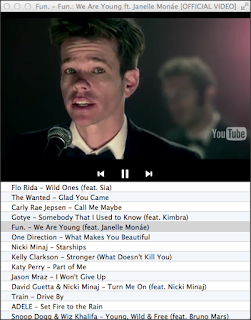 In addition to automatically having access to each country's top 100 songs, you are also able to search for other songs if there is something you want to hear that isn't on there. Now I do find that if you are searching for something more obscure, you are less likely to find what you're looking for, but the same thing would happen if you're looking directly on YouTube. Most songs that show up in the search/top-100 list have links directly to iTunes where you can buy the official track or music video. It would be nice if they add a link to purchase the song itself too, but that doesn't seem to be a feature in the app just yet. I'm told that the company that makes the app is considering putting some settings into place to let you filter out songs with explicit ratings (making it sort-of kid safe, though I personally wouldn't play much of this stuff with my preschooler around), but there's no word yet on when that might be available. So for now, this app gets the mommy stamp of approval, but consider it one you'd use when your kids are asleep or in another room
 playing quietly by themselves getting into trouble.
This is currently a Mac only app, available for download in the Mac App Store for $0.99, a pretty small price to pay to have all this music at your fingertips. Plus, I have a bunch of promo codes to give away, so you could have the app for free! Here's what I'm going to do. I will give away 1 promo code. If I get more than 10 entries to this giveaway, I'll give away a second promo code. 20 entries? I'll throw in another one to give away. (Max 10 promo codes to be given away). So share this review, and tell your mac-owning friends, as in this case, more entries could actually improve your odds of winning (2/11 is better than 1/9, right?)
To find out more, or to buy this app, visit http://itunes.apple.com/us/app/free-music-player/id502305134?mt=12
Now I'm more of an independent music fan, myself, and there are lots of artists on my music playlist that I guarantee you've never heard of (or maybe you have, some of my favourite indie acts have a way of making it big, and I don't realize it til I'm out shopping and hear a song I actually know playing on the speakers in a store...). But as you know I'm also a runner, and as I'm training for a race this spring (actually training this time, not winging it like last time I tried a 10K...), I like having a selection of newer, upbeat music to run to. Problem is, I don't know any of it. And there's only so much you can glean from a 30 second clip in the iTunes preview. Wouldn't it be great if I could listen to some top-100 music at home, so that I can then go and buy the tracks I really like? Without having the blaring, screaming ads that all the popular radio stations are so full of? Yes please!
Well it turns out that with youTunes, you can do just that, and more. YouTunes is a free music player that lists the current top 100 tracks of pretty much whatever country you can think of, lets you add them to your own custom playlist(s), and then not only plays the song but also shows the corresponding video from YouTube. Sometimes it's a music video, sometimes it has lyrics instead, but regardless, it's a nice way to catch up on what's hip outside of the preschooler scene. It has great potential for a mom's night in (or as a prelude to mom's night out) by gathering up all the stuff that's playing on the dance floor, for your own party at home or in a hotel, as long as someone brought a MacBook and there's free Wifi...
 In addition to automatically having access to each country's top 100 songs, you are also able to search for other songs if there is something you want to hear that isn't on there. Now I do find that if you are searching for something more obscure, you are less likely to find what you're looking for, but the same thing would happen if you're looking directly on YouTube. Most songs that show up in the search/top-100 list have links directly to iTunes where you can buy the official track or music video. It would be nice if they add a link to purchase the song itself too, but that doesn't seem to be a feature in the app just yet. I'm told that the company that makes the app is considering putting some settings into place to let you filter out songs with explicit ratings (making it sort-of kid safe, though I personally wouldn't play much of this stuff with my preschooler around), but there's no word yet on when that might be available. So for now, this app gets the mommy stamp of approval, but consider it one you'd use when your kids are asleep or in another room
 This is currently a Mac only app, available for download in the Mac App Store for $0.99, a pretty small price to pay to have all this music at your fingertips. Plus, I have a bunch of promo codes to give away, so you could have the app for free! Here's what I'm going to do. I will give away 1 promo code. If I get more than 10 entries to this giveaway, I'll give away a second promo code. 20 entries? I'll throw in another one to give away. (Max 10 promo codes to be given away). So share this review, and tell your mac-owning friends, as in this case, more entries could actually improve your odds of winning (2/11 is better than 1/9, right?)
To find out more, or to buy this app, visit http://itunes.apple.com/us/app/free-music-player/id502305134?mt=12
Monday, November 28, 2011
Today in History App

The app also has categories for Births, Deaths, and Holidays so you can see what famous/important people were born or died on this day in history, and if it is a holiday anywhere in the world. You can preview the sort of information that the app displays by visiting the website, www.todayhistory.net. In addition to just displaying the brief information, you can also click on an event and view more details, or click on a related link and visit the Wikipedia entry. This can lead to all sorts of interesting articles to let you dig deeper into the historical event or related places or people.
Interestingly, the app also has some built in social aspects as well, where you can add historical events to your favourites list, or you can comment on them. You can also send any event to Facebook, Twitter, or to a friend via email or text message. You can even submit your own events for consideration in the app - I haven't tried that yet (somehow I don't think that anyone else out there would be too interested in reading about "Got my winter tires on today").
You could however use the Private event option for creating events that only you want to keep track of, which I thought would be neat for tracking a baby's milestones, especially ones that you would almost certainly forget when they are older, like when they learned to sit unassisted, or exactly when they finally sprouted that first tooth.
If you think you might like it I would go for the free version to try it out, and once you know if you enjoy having all that historical information at your fingertips, then go for it and pick up the full version for $1.99 here in the app store: http://itunes.apple.com/us/app/today-in-history/id312028507?mt=8 You'll never be without something interesting to say with such an interesting reference at your fingertips.
*Disclaimer: Geekmommy Reviews was given free of charge the product(s) to review in exchange for featuring this product on http://www.geekmommyreviews.com. Any opinions or statements given above come only from Geekmommy Reviews and were not influenced in any way by the product vendor.
Wednesday, November 23, 2011
Scribblenauts Remix App

It has a unique gameplay that appeals to the problem solver in all of us, and also caters to the silly factor that takes over most interactions with a preschooler. The premise of the game is that you have to help the main character, Maxwell, collect the star in each level. He is faced with various problems to solve in order to earn/access the star. To solve problems, you think of what thing(s) he need(s) to solve his problem, then give it to him by typing in a noun (and any number of adjectives).
 For example [Spoiler Alert] there is a level where you need to push a button to open a gate. But the button is in an area that Maxwell can't walk to. So, you can choose to fly him up there. Make him a Pegasus, he will ride it. P-E-G-A-S-U-S. Or, you can give him a jetpack. Or you can create a H-U-G-E B-A-L-D E-A-G-L-E, and he will be able to climb on his back and fly up. You can use adjectives such as "tiny", "friendly", "blue", "gigantic", "scary" and so forth to enhance the objects you create. I cannot imagine how much effort must have gone into mapping just about every noun imaginable to a concrete in-game representation of the noun, but the effort is worth it because half the fun in the game is to create something outrageous and see what appears.
As an adult, I enjoy playing this game because it helps boost my creativity, and it's tons of fun. My son (who is not quite old enough to spell most words) likes to play the game together with me, as I read him the problem, he brainstorms solutions, and I type them in. He has even played it by himself by randomly typing on the keyboard and then picking from the "Did you mean..." suggestions that pop up when the characters don't represent a real word.
 Apparently this game is not entirely new, however it's my first time playing it and I have to admit, I was blown away.
If you haven't played this before and think it sounds like fun, it's only $1.99 on the iTunes app store (for the iPad/iPhone) and will provide hours of entertainment, even after you finish the story mode, because you can always think of new creative ways to solve the problems Maxwell faces.
Check out more on this app here: http://itunes.apple.com/ca/app/scribblenauts-remix/id444844790?mt=8
Monday, October 24, 2011
The Little Lasso
There's a fine line between a baby dropping a toy ("Oops!"), and a baby tossing it on the floor just because it's a fun game for her to throw it and you to pick it up. Fun for baby, maybe not so much fun for you. Especially if we're talking about a busy (germy!) restaurant floor... or a sidewalk... or the backseat of your car. There are many different styles of tethers and toy leashes out there, and I can't speak for all of them, but I can share with you the great features of "the little lasso", a made-in-USA tether that can hold a sippy cup just as well as a tag blanket, and whose website encourages you to "stop playing fetch". With a "C" shaped plastic oval loop on one end (firmly attached so it can be moved a bit but not removed, at least not by baby) and a "noose" on the other end that adjusts to hold just about anything you want to keep off the floor. The little lasso has a sturdy elastic encased in a gathered tube of machine washable fabric, and has three large plastic beads threaded on it to allow the size of the tether noose to be adjusted.
An adult can easily insert a toy into the noose and then tighten the bead/elastic of the tether to ensure a good tight fit. The other end of the tether (the plastic clip end) then can attach to baby's highchair or stroller (or wherever else you need it). Being about a foot long from clip to toy, it will keep things from hitting the floor when dropped, preventing unnecessary spills and broken items, as well as saving your back (and perhaps also some of your sanity as well). Simply give the tether a tug to retrieve the dropped item, and you and baby can get on with your day. Eventually, baby will probably learn how to retrieve the item herself, although it's anyone's guess if (s)he will ever be satisfied without your intervention for each "oops"...
I find the little lasso most helpful at dinnertime, whether at home or away - to keep a few toys attached to baby's high chair while I hustle to get supper on the table (or on special occasions, while I sip wine and look forward to the wait staff bringing my plate from the restaurant kitchen...) My little one also seems amused with its elastic properties - Daddy holds onto the clip, baby holds onto the toy. Tug of war ensues...eventually baby lets go of the toy and BOING-G-G-G off it goes - laughs all around. Plus the toy is still on the tether so no one has to go chase it down.
If you think something like this can help you to save time, energy, and stop the endless cycle of pickup/wipe off/give to baby/drop/pickup, have a look over at http://www.thelittlelasso.com/, check out all of their lovely designer fabric patterns, and maybe pick up a few for yourself or for the next baby shower you get invited to. You won't regret it!
An adult can easily insert a toy into the noose and then tighten the bead/elastic of the tether to ensure a good tight fit. The other end of the tether (the plastic clip end) then can attach to baby's highchair or stroller (or wherever else you need it). Being about a foot long from clip to toy, it will keep things from hitting the floor when dropped, preventing unnecessary spills and broken items, as well as saving your back (and perhaps also some of your sanity as well). Simply give the tether a tug to retrieve the dropped item, and you and baby can get on with your day. Eventually, baby will probably learn how to retrieve the item herself, although it's anyone's guess if (s)he will ever be satisfied without your intervention for each "oops"...
I find the little lasso most helpful at dinnertime, whether at home or away - to keep a few toys attached to baby's high chair while I hustle to get supper on the table (or on special occasions, while I sip wine and look forward to the wait staff bringing my plate from the restaurant kitchen...) My little one also seems amused with its elastic properties - Daddy holds onto the clip, baby holds onto the toy. Tug of war ensues...eventually baby lets go of the toy and BOING-G-G-G off it goes - laughs all around. Plus the toy is still on the tether so no one has to go chase it down.
If you think something like this can help you to save time, energy, and stop the endless cycle of pickup/wipe off/give to baby/drop/pickup, have a look over at http://www.thelittlelasso.com/, check out all of their lovely designer fabric patterns, and maybe pick up a few for yourself or for the next baby shower you get invited to. You won't regret it!
Monday, September 19, 2011
Infantino EcoSash Wrap & Tie Carrier
After my review of the Moby Wrap, it should come as no surprise to you that I enjoy babywearing. Or, should I say, I enjoy the freedom it gives me. Freedom from having a heavy carseat tugging at my arm sockets. Freedom from having to balance a baby on one hip while reaching for a cup of coffee with my free arm (and then attempting to drink said coffee without baby splashing it all over both of us with her endlessly waving arms). Freedom to shop at Costco without having to leave the baby in her carseat on the "Carts" side of the checkout.
I have heard many great things about the Ergo baby carrier, and had the opportunity to take it for a test drive with my little girl last month as my sister let me try hers out. This isn't an Ergo review (since I don't own one, I am not going to consider myself qualified to review it) but there were a handful of thoughts that came to mind when I used it. First of all, I really liked the support around the waist/hips. And the fabric was really nice and soft (she has the ERGObaby Black Sport Carrier). So I got my daughter adjusted in the front carry, I had the padded shoulder straps over my shoulders, and then - I had to get my sister to close the buckle. I don't know about you, but I don't always run around with an assistant. Unless you could count my 4 year old, which I don't, because if I'd asked him to close a buckle on the Ergo he'd probably answer by saying something like "rawrrrr, I'm pretending to be a spike-o-saurus" and headbutting my hip. And I'd be left trying to safely buckle in a squirmy baby in a parking lot by taking both hands off her and reaching over my head and ... ouch. My neck and back hurt just thinking about it.
I love the Moby Wrap because it's so simple. One knot, and you're done. I just wanted something like that, only with a little less fabric to deal with. So I went to a local store that carried a number of babywearing options, and tried out several different styles of carriers. I tried the BabyHawk Mei Tai (loved it, but they only had one in stock and I didn't like the fabric), another very soft similar style carrier, the brand of which I cannot recall right now (loved how small it folded up, it would literally fit into my coat pocket, but did not like that the straps had no padding), and finally the Infantino EcoSash Wrap & Tie Carrier. It was packaged up in its own carrying/laundering bag made of a black mesh, so I did have to dismantle the packaging to try it on. Thankfully the store owner was OK with this.
 I love how there are no buckles to fuss with, but the carrier still feels somewhat structured. It has a reversible front fabric panel (goes from modern abstract vines to plain black, in case I have to make my husband wear it somewhere) and two loops into which to thread the shoulder straps to facilitate an easy back carry (or to make the front carry a bit more secure by ensuring the straps coming from behind you stay in place around the height of baby's torso. The EcoSash actually has the wearing instructions printed on satiny soft panels so that you don't always need the book in front of you (when you are starting out, use the book. Once you are adept at wearing it, you won't really need the instructions in either place. You double-knot the shorter straps around your waist, then hold baby in front of you, lift the front part, long straps go over shoulders, criss-cross behind you, feed through the front loops on left & right, then double-knot in the front. The shoulder straps are padded and so are quite comfortable even after a few hours of wearing with an 18lb baby in it (I haven't worn it for longer than that, so I can't comment what it would be like to wear all day). I do wish that the waist straps were either padded or stiffened in some way, because even though they are nice and wide, they do just sort of bunch together after being knotted around my squishy middle section (AKA waist).
The carrier is also baby approved, she is warm and comfortable in it, and apparently sucking/chewing on the shoulder straps is a fun and tasty way to pass the time. She also loves being able to look right up at me, and to look around at everything going on, especially when we are out shopping. I love that when she is in the baby carrier, random strangers are less likely to touch her than when she's in her carseat (although, random strangers' children are not shy at all about holding her hands, which dangle out of the sides of the carrier most of the time...).
I have not yet laundered my carrier, and since it is a deep black colour, I will likely wash it on its own the first time, maybe with an old cloth tossed in to see if it stains other clothes. It does come with its own mesh bag for laundering, so that is a nice feature. I can just imagine what fun it would be to have to untangle all 4 straps from my old school top loader's agitator...*shudder*. If I find any major issues after laundering I will be sure to update here.
**Updated**, so I laundered the Infantino EcoSash Wrap & Tie Carrier a couple of days ago, in the mesh bag that comes with it. It washed just fine, and did not stain my other clothes (granted, I washed it with all my "dark" delicates, I wouldn't throw it in with anything white or light coloured). I must not have tied the mesh bag tightly enough, because the straps did work their way out of the top opening and snaked around my top loader, though they did not actually get tangled with anything. I had to hang it up to dry, and we've been having awful wet weather here, so it's day two of indoor hanging to dry, and it's still a bit damp. It says explicitly not to put it in the dryer though, so I will just try and be patient while it dries (and use my Moby wrap in the meantime).
If you want to learn more about the Infantino EcoSash Wrap & Tie Carrier, check out the product page on Infantino's website. You can also read more here on Step2's website. It sells for anywhere between $60 and $80 depending on where you shop.
I have heard many great things about the Ergo baby carrier, and had the opportunity to take it for a test drive with my little girl last month as my sister let me try hers out. This isn't an Ergo review (since I don't own one, I am not going to consider myself qualified to review it) but there were a handful of thoughts that came to mind when I used it. First of all, I really liked the support around the waist/hips. And the fabric was really nice and soft (she has the ERGObaby Black Sport Carrier). So I got my daughter adjusted in the front carry, I had the padded shoulder straps over my shoulders, and then - I had to get my sister to close the buckle. I don't know about you, but I don't always run around with an assistant. Unless you could count my 4 year old, which I don't, because if I'd asked him to close a buckle on the Ergo he'd probably answer by saying something like "rawrrrr, I'm pretending to be a spike-o-saurus" and headbutting my hip. And I'd be left trying to safely buckle in a squirmy baby in a parking lot by taking both hands off her and reaching over my head and ... ouch. My neck and back hurt just thinking about it.
I love the Moby Wrap because it's so simple. One knot, and you're done. I just wanted something like that, only with a little less fabric to deal with. So I went to a local store that carried a number of babywearing options, and tried out several different styles of carriers. I tried the BabyHawk Mei Tai (loved it, but they only had one in stock and I didn't like the fabric), another very soft similar style carrier, the brand of which I cannot recall right now (loved how small it folded up, it would literally fit into my coat pocket, but did not like that the straps had no padding), and finally the Infantino EcoSash Wrap & Tie Carrier. It was packaged up in its own carrying/laundering bag made of a black mesh, so I did have to dismantle the packaging to try it on. Thankfully the store owner was OK with this.

The carrier is also baby approved, she is warm and comfortable in it, and apparently sucking/chewing on the shoulder straps is a fun and tasty way to pass the time. She also loves being able to look right up at me, and to look around at everything going on, especially when we are out shopping. I love that when she is in the baby carrier, random strangers are less likely to touch her than when she's in her carseat (although, random strangers' children are not shy at all about holding her hands, which dangle out of the sides of the carrier most of the time...).
I have not yet laundered my carrier, and since it is a deep black colour, I will likely wash it on its own the first time, maybe with an old cloth tossed in to see if it stains other clothes. It does come with its own mesh bag for laundering, so that is a nice feature. I can just imagine what fun it would be to have to untangle all 4 straps from my old school top loader's agitator...*shudder*. If I find any major issues after laundering I will be sure to update here.
**Updated**, so I laundered the Infantino EcoSash Wrap & Tie Carrier a couple of days ago, in the mesh bag that comes with it. It washed just fine, and did not stain my other clothes (granted, I washed it with all my "dark" delicates, I wouldn't throw it in with anything white or light coloured). I must not have tied the mesh bag tightly enough, because the straps did work their way out of the top opening and snaked around my top loader, though they did not actually get tangled with anything. I had to hang it up to dry, and we've been having awful wet weather here, so it's day two of indoor hanging to dry, and it's still a bit damp. It says explicitly not to put it in the dryer though, so I will just try and be patient while it dries (and use my Moby wrap in the meantime).
If you want to learn more about the Infantino EcoSash Wrap & Tie Carrier, check out the product page on Infantino's website. You can also read more here on Step2's website. It sells for anywhere between $60 and $80 depending on where you shop.
Tuesday, September 13, 2011
The Laundry Tarts
What's powdery, white, made in Canada, smells delicious, and got the funky smell right out of my daughter's cloth diapers? It's a magnificent new all-natural laundry detergent from The Laundry Tarts. With delicious flavours scents such as Key Lime Pie, Black Forest Cake, and Oatmeal Almond, it's hard to believe you're not supposed to just spoon this stuff into a bowl for dessert. I received two sample bags of The Laundry Tarts detergent from Monkey Doodlez, one Key Lime Pie, one Pina Colada (thank you!). The first thing I noticed when I opened the shipping envelope was the lovely scent wafting up to meet my nose. I'm not talking about anything strong or overpowering, rather, it was more of a subtle scent, clean and fresh, but not artificial or perfumey. That's probably because the entire bag of laundry detergent contains only natural ingredients - there is nothing artificial about it. The entire product line of detergent, stain remover, and shaker is (to quote their website) "hypoallergenic, 100% vegan and free of phosphates, EDTA, pthalates, parabens, SLS, SLES, nitrates, sulphites and chlorine". Try saying that five times fast! The ingredient list is shorter than you could even imagine, consisting mainly of baking soda, soda wash, powdered hydrogen peroxide, and sea salt. Throw in some rosemary extract, saponified canola & coconut oils, and essential oils (for fragrance), and you've got yourself a bag of detergent. It's safe for your clothes, your skin, and the environment.
 I was at first skeptical about using this detergent with my daughter's cloth diapers. As you can read in previous posts, I launder her pocket diapers & liners every 3 days, using EcoNuts, cold soak, hot wash, and double cold rinse, then I hang them to dry. They have always come out clean, but often they smell a little funky. On occasion, I can chalk this up to FORGETTING to toss in the bag of EcoNuts after the soak cycle (shame on me!), other times I have blamed my timing - I tend to do the soak/wash/rinse before bed, and the 2nd rinse the next morning, before hanging them out. I figured that leaving them in the washer overnight is what caused them to sometimes pick up a funky smell. However, it seems I might be wrong about that - after checking on The Laundry Tarts' website to make certain the detergent is safe for cloth diapers (it totally is), I followed the same process (using 3 tablespoons for my old school top loading washer) and found that the entire load of diapers smelled really fresh and clean the next morning when I was hanging them out. Note that they did NOT smell of fragrance, artificial perfumes, or funk. They just smelled clean. After hanging them out to dry, I took them in and thought they looked even whiter than usual, and they were SO FREAKING SOFT - perhaps the sea salt in the detergent helped with that? I continued to use the diapers on my daughter and there were no unusual effects, rashes, etc, that sometimes happen when switching detergents. I'm sure she'll be thrilled when she grows up that I used her as a diaper detergent guinea pig.
I also tried using the detergent with a load of dark laundry, to make sure it rinsed clean (it did, even with a very full load of laundry, a cold wash cycle, and only a single rinse). It even worked on my delicates and hand-wash items. Which I wash in my machine on the delicate cycle, because honestly, is a mom supposed to have time to hand wash anything?? After washing a load of towels & facecloths with The Laundry Tarts detergent, I did one of those goofy comparisons like they used to do in fabric softener commercials... I stacked up 5 baby facecloths that were previously laundered (probably with EcoNuts), and 5 that were laundered using The Laundry Tarts, and sure enough, the stack laundered with The Laundry Tarts was taller. I probably should have taken a photo (oops) but didn't think of it. You'll just have to take my word for it.
Now taller stacks of facecloths are not usually a reason for me to choose one detergent over another. But I have to say that the ability of The Laundry Tarts to brighten my diaper laundry, rinse out clean, and leave them smelling fresh instead of funky, is enough to make me want to buy a big ol' bag of this stuff. I will probably re-purpose an old measuring cup to work as a scoop for the detergent, because as of right now, it does not come with its own measuring scoop. They recommend using 2-4 tbsp per load (half that for HE machines) so you do need to be able to get the right amount out of the bag and into your machine. I just used one of my kitchen tablespoons for testing the samples, but when it becomes a permanent fixture in my laundry room, I would want a dedicated scoop.
 If you love the fact that The Laundry Tarts detergent is all-natural, made in Canada, and (most importantly) great at getting your laundry clean, then you should also know that they have generously offered a discount code for15% off all Laundry Tarts products (detergent, samples, stain sticks and shaker bon bons) at www.monkeydoodlez.com and participating retailers. To take advantage of this offer be sure to enter the code "geekmommy15" (without the quotes) when you are going through the checkout process. Note that they've indicated that their shipping quotes are not working quite right on the Monkey Doodlez site, so please disregard the shipping quotes from the site and they will provide you with a correct total in an invoice prior to processing payment. This discount expires in 7 days (so by September 20th!) so hurry if you are interested! I know I'll be ordering some!
*Disclaimer: Geekmommy Reviews was given free of charge two small samples of the product(s) to review in exchange for featuring this product on http://www.geekmommyreviews.com. Any opinions or statements given above come only from Geekmommy Reviews and were not influenced in any way by the product vendor.
 I was at first skeptical about using this detergent with my daughter's cloth diapers. As you can read in previous posts, I launder her pocket diapers & liners every 3 days, using EcoNuts, cold soak, hot wash, and double cold rinse, then I hang them to dry. They have always come out clean, but often they smell a little funky. On occasion, I can chalk this up to FORGETTING to toss in the bag of EcoNuts after the soak cycle (shame on me!), other times I have blamed my timing - I tend to do the soak/wash/rinse before bed, and the 2nd rinse the next morning, before hanging them out. I figured that leaving them in the washer overnight is what caused them to sometimes pick up a funky smell. However, it seems I might be wrong about that - after checking on The Laundry Tarts' website to make certain the detergent is safe for cloth diapers (it totally is), I followed the same process (using 3 tablespoons for my old school top loading washer) and found that the entire load of diapers smelled really fresh and clean the next morning when I was hanging them out. Note that they did NOT smell of fragrance, artificial perfumes, or funk. They just smelled clean. After hanging them out to dry, I took them in and thought they looked even whiter than usual, and they were SO FREAKING SOFT - perhaps the sea salt in the detergent helped with that? I continued to use the diapers on my daughter and there were no unusual effects, rashes, etc, that sometimes happen when switching detergents. I'm sure she'll be thrilled when she grows up that I used her as a diaper detergent guinea pig.
I also tried using the detergent with a load of dark laundry, to make sure it rinsed clean (it did, even with a very full load of laundry, a cold wash cycle, and only a single rinse). It even worked on my delicates and hand-wash items. Which I wash in my machine on the delicate cycle, because honestly, is a mom supposed to have time to hand wash anything?? After washing a load of towels & facecloths with The Laundry Tarts detergent, I did one of those goofy comparisons like they used to do in fabric softener commercials... I stacked up 5 baby facecloths that were previously laundered (probably with EcoNuts), and 5 that were laundered using The Laundry Tarts, and sure enough, the stack laundered with The Laundry Tarts was taller. I probably should have taken a photo (oops) but didn't think of it. You'll just have to take my word for it.
Now taller stacks of facecloths are not usually a reason for me to choose one detergent over another. But I have to say that the ability of The Laundry Tarts to brighten my diaper laundry, rinse out clean, and leave them smelling fresh instead of funky, is enough to make me want to buy a big ol' bag of this stuff. I will probably re-purpose an old measuring cup to work as a scoop for the detergent, because as of right now, it does not come with its own measuring scoop. They recommend using 2-4 tbsp per load (half that for HE machines) so you do need to be able to get the right amount out of the bag and into your machine. I just used one of my kitchen tablespoons for testing the samples, but when it becomes a permanent fixture in my laundry room, I would want a dedicated scoop.
If you love the fact that The Laundry Tarts detergent is all-natural, made in Canada, and (most importantly) great at getting your laundry clean, then you should also know that they have generously offered a discount code for15% off all Laundry Tarts products (detergent, samples, stain sticks and shaker bon bons) at www.monkeydoodlez.com and participating retailers. To take advantage of this offer be sure to enter the code "geekmommy15" (without the quotes) when you are going through the checkout process. Note that they've indicated that their shipping quotes are not working quite right on the Monkey Doodlez site, so please disregard the shipping quotes from the site and they will provide you with a correct total in an invoice prior to processing payment. This discount expires in 7 days (so by September 20th!) so hurry if you are interested! I know I'll be ordering some!*Disclaimer: Geekmommy Reviews was given free of charge two small samples of the product(s) to review in exchange for featuring this product on http://www.geekmommyreviews.com. Any opinions or statements given above come only from Geekmommy Reviews and were not influenced in any way by the product vendor.
Sunday, September 11, 2011
1Password
A mom, at any given moment, has what feels like a million different things to remember. Things like where her keys are, what she promised to bring to Saturday's potluck dinner party, her son's favourite cartoon character, the fact that she needs to pick up a kitchen timer and potting soil next time she's out shopping, and of course, all fifteen thousand passwords to every single website she has ever signed up for.
There's not much I can do for you if you don't have a place by the front door for your keys or a shopping list where to note down things you have to buy (may I suggest Grocery IQ?) However, I think I can help with that last one. 1Password is a secure way to manage your passwords & online identities, as well as to keep track of other important, sensitive pieces of data. With a tagline of "Have you ever forgotten a password?" it's easy to see how this piece of software can be useful in anyone's life, including a busy mom with more important things on her mind than what her log on credentials are to the local recreation centre's online registration system.
With versions for Mac, Windows, iPhone, iPad, and Android, plus web browser integration, you will honestly never have to look far for your passwords. Now there are some other ways to go about password management. The easiest of course being to use the same password everywhere. Oh, except that's actually a really, really dumb idea. Not every place is as security conscious as your online banking might be, and giving away your email/password combination at just one site that becomes compromised (or has questionable security/privacy to begin with) can result in your identity at many other sites being compromised by someone trying your email/password combination there. Plus, different websites have different password requirements, so maybe one will be OK with your easy to remember "qwerty" or "abc123" but others will need you to have 2 letters, 2 numbers, and 5 interspersed asterisks or tildes (~). Not to mention, that your usernames may also be different from one site to another. Gosh, it's making my head hurt just thinking about it.
With 1Password, as the name suggests, you only need to remember ONE password. Make it a multi-word password instead of a gibberish series of letters, numbers, and symbols, and it becomes even easier to recall. This one password unlocks the 1Password tool - on your computer or on your phone, and you can then easily log in, either by copying the credentials for a form you are already on in your browser, or by clicking a link inside 1Password which automatically launches the browser and logs you in to where you want to go. The password data file is secure & encrypted, and you can opt to store it in the cloud (so it's available to you everywhere), or in your Dropbox account (there are many other options as well such as a password-protected PDF, or a file to put on your own USB stick). I personally use the Dropbox syncing service, and my husband and I share the password data file, so yeah, he can access the password to read my email, but if I get hit by a bus tomorrow, he can also pay the electric bill. (That works for us. Your situation may vary.)
One of my favourite features of 1Password is the ability to generate passwords - so I don't have to keep thinking up unique, clever passwords - I can just have the app generate them and it stores them for me. It has made me feel much better about my online life, being able to have a unique and secure password for each site I have an account on, and to be able to manage all of these from one simple and accessible place. Another great feature is the browser integration - I don't even have to open 1Password to use my passwords - I just click the integrated button, enter my master password (I can set the timeout period so I don't have to enter it All.The.Time), and bam, it fills in my credentials for whatever site I'm on.
You can read more about 1Password or download your free trial over at https://agilebits.com/1Password. 1Password costs $39.99 for Mac or Windows, and $14.99 for iPhone/iPad. For some reason, it appears to be free for Android (lucky you guys!).
There's not much I can do for you if you don't have a place by the front door for your keys or a shopping list where to note down things you have to buy (may I suggest Grocery IQ?) However, I think I can help with that last one. 1Password is a secure way to manage your passwords & online identities, as well as to keep track of other important, sensitive pieces of data. With a tagline of "Have you ever forgotten a password?" it's easy to see how this piece of software can be useful in anyone's life, including a busy mom with more important things on her mind than what her log on credentials are to the local recreation centre's online registration system.
With versions for Mac, Windows, iPhone, iPad, and Android, plus web browser integration, you will honestly never have to look far for your passwords. Now there are some other ways to go about password management. The easiest of course being to use the same password everywhere. Oh, except that's actually a really, really dumb idea. Not every place is as security conscious as your online banking might be, and giving away your email/password combination at just one site that becomes compromised (or has questionable security/privacy to begin with) can result in your identity at many other sites being compromised by someone trying your email/password combination there. Plus, different websites have different password requirements, so maybe one will be OK with your easy to remember "qwerty" or "abc123" but others will need you to have 2 letters, 2 numbers, and 5 interspersed asterisks or tildes (~). Not to mention, that your usernames may also be different from one site to another. Gosh, it's making my head hurt just thinking about it.
With 1Password, as the name suggests, you only need to remember ONE password. Make it a multi-word password instead of a gibberish series of letters, numbers, and symbols, and it becomes even easier to recall. This one password unlocks the 1Password tool - on your computer or on your phone, and you can then easily log in, either by copying the credentials for a form you are already on in your browser, or by clicking a link inside 1Password which automatically launches the browser and logs you in to where you want to go. The password data file is secure & encrypted, and you can opt to store it in the cloud (so it's available to you everywhere), or in your Dropbox account (there are many other options as well such as a password-protected PDF, or a file to put on your own USB stick). I personally use the Dropbox syncing service, and my husband and I share the password data file, so yeah, he can access the password to read my email, but if I get hit by a bus tomorrow, he can also pay the electric bill. (That works for us. Your situation may vary.)
One of my favourite features of 1Password is the ability to generate passwords - so I don't have to keep thinking up unique, clever passwords - I can just have the app generate them and it stores them for me. It has made me feel much better about my online life, being able to have a unique and secure password for each site I have an account on, and to be able to manage all of these from one simple and accessible place. Another great feature is the browser integration - I don't even have to open 1Password to use my passwords - I just click the integrated button, enter my master password (I can set the timeout period so I don't have to enter it All.The.Time), and bam, it fills in my credentials for whatever site I'm on.
You can read more about 1Password or download your free trial over at https://agilebits.com/1Password. 1Password costs $39.99 for Mac or Windows, and $14.99 for iPhone/iPad. For some reason, it appears to be free for Android (lucky you guys!).
Thursday, August 25, 2011
Leading Lady - Nursing Bras and More - GIVEAWAY
Last week, I received a wonderful package in the mail. I had been anticipating a nursing bra from Leading Lady to review on this blog, and imagine my delight when in the box were TWO lovely nursing bras, exactly the ones I had hoped to be able to review for you all.
Leading Lady is more than just a retailer of nursing and full-figure bras, they also support nursing moms via their website. They have a dedicated section of their website called Amy's Corner where user submitted questions are answered by a lactation consultant. Their helpful articles there include tips on breastfeeding in the heat of summer, breastfeeding your baby when you are sick, and making holidays less stressful so you can spend more time with baby.
They also make and sell some great and affordable nursing bras, such as the "Baby Sees It" molded seamless underwire, and the lovely molded seamless lace edged underwire, both of which I will review here. Each of these two bras is well made, the stitching is tight and secure, and the bands are wide enough for a triple hook closure (there are also FOUR! different closure settings so I could really customize the fit). They both look brand new even after being worn, spit up on, and washed. The cups are molded so even when nursing, I can maintain a sleek silhouette under summer's light tees and tanks*. The inside slings are secure and so I felt supported even when baby was nursing, and the fact it didn't shift around also made it easy to pull up the molded cup and fasten the clasp with one hand while balancing a sleepy baby with the other hand. The openings are generously sized, and do not leave any unsightly bulges at all. When I chose the size bra to order, I followed the website's fit guide, which suggested a 36C. I am currently wearing a 36D and 34D in other brands, so I took a chance, and ordered a 34D despite the size chart's recommendation. Both bras fit me very well, however, the band on the Baby Sees It bra is less stretchy than the lace edged one, and so I have to wear it on the very last closure setting. If you are uncertain which band size to order, for this style I would suggest rounding up, since it has four settings for the closure, you should get a good fit that way. The lace edged one fits like it was made for me, since the band is a bit stretchier, and so I use one of the middle 2 sets of hooks to close it.
* Both bras also received the husband-thinks-they're-sexy stamp of approval.
The Baby Sees It bra has a couple of really neat special features: the sling fabric is printed with a bold high-contrast pattern to draw baby's attention to it while feeding, and the straps are wider and padded for comfort. I found that when nursing with a button front shirt, the printed sling "Baby Sees It" feature really did draw my baby's hands and eyes to it (and kept her from pulling my hair, yay!). The effect was a little less noticeable when nursing in a shirt lifted up for baby's access, because the tucked up shirt covered part of the sling. I was concerned that the print might be distracting or keep baby from falling asleep at the breast but I didn't have to worry (I guess the sleep-inducing powers of breastmilk are hard to beat). The wide padded straps really added to the comfort of this bra, my only other molded bra up til now has ridiculously tiny straps that dig in within the first hour of wearing it. Now that I have these two lovely bras in my collection, that old one is going into the bin.
I was unsure about how comfortable a lace edged underwire bra could be, since lace can be a scratchy material, but the lace used in this bra is the softest I've ever felt, it looks very elegant and feels so soft against my skin. The straps are not padded like the Baby Sees It, but they are still generously wide, and have the convenient feature of adjusting in length at the FRONT. Most bras have the strap length adjustment in the back, but this bra has it on the front of the strap so you can actually get the correct length without having to either contort your arms behind you or take it off to do the adjustment free-hand while you are not wearing it.
Leading Lady has been kind enough to offer to ONE of my readers a $10 discount off your order with free shipping on the entire order. They do only ship to the US at this time, so this giveaway would make sense for my US readers or those with a US shipping address. To enter, please visit their website (http://www.leadinglady.com/) and leave a comment here saying what you'd like to order using the $10 discount.
Their bra prices are already very reasonable, so having an extra $10 off plus free shipping would be a great deal! They also are running a great deal on their website right now (til August 31st 2011) with 20% off your order and free shipping if you buy over $75.
Plus earn up to 3 extra entries by:
*Disclaimer: Geekmommy Reviews was given free of charge the product(s) to review in exchange for featuring this product on http://www.geekmommyreviews.com. Any opinions or statements given above come only from Geekmommy Reviews and were not influenced in any way by the product vendor.
Leading Lady is more than just a retailer of nursing and full-figure bras, they also support nursing moms via their website. They have a dedicated section of their website called Amy's Corner where user submitted questions are answered by a lactation consultant. Their helpful articles there include tips on breastfeeding in the heat of summer, breastfeeding your baby when you are sick, and making holidays less stressful so you can spend more time with baby.
They also make and sell some great and affordable nursing bras, such as the "Baby Sees It" molded seamless underwire, and the lovely molded seamless lace edged underwire, both of which I will review here. Each of these two bras is well made, the stitching is tight and secure, and the bands are wide enough for a triple hook closure (there are also FOUR! different closure settings so I could really customize the fit). They both look brand new even after being worn, spit up on, and washed. The cups are molded so even when nursing, I can maintain a sleek silhouette under summer's light tees and tanks*. The inside slings are secure and so I felt supported even when baby was nursing, and the fact it didn't shift around also made it easy to pull up the molded cup and fasten the clasp with one hand while balancing a sleepy baby with the other hand. The openings are generously sized, and do not leave any unsightly bulges at all. When I chose the size bra to order, I followed the website's fit guide, which suggested a 36C. I am currently wearing a 36D and 34D in other brands, so I took a chance, and ordered a 34D despite the size chart's recommendation. Both bras fit me very well, however, the band on the Baby Sees It bra is less stretchy than the lace edged one, and so I have to wear it on the very last closure setting. If you are uncertain which band size to order, for this style I would suggest rounding up, since it has four settings for the closure, you should get a good fit that way. The lace edged one fits like it was made for me, since the band is a bit stretchier, and so I use one of the middle 2 sets of hooks to close it.
* Both bras also received the husband-thinks-they're-sexy stamp of approval.
The Baby Sees It bra has a couple of really neat special features: the sling fabric is printed with a bold high-contrast pattern to draw baby's attention to it while feeding, and the straps are wider and padded for comfort. I found that when nursing with a button front shirt, the printed sling "Baby Sees It" feature really did draw my baby's hands and eyes to it (and kept her from pulling my hair, yay!). The effect was a little less noticeable when nursing in a shirt lifted up for baby's access, because the tucked up shirt covered part of the sling. I was concerned that the print might be distracting or keep baby from falling asleep at the breast but I didn't have to worry (I guess the sleep-inducing powers of breastmilk are hard to beat). The wide padded straps really added to the comfort of this bra, my only other molded bra up til now has ridiculously tiny straps that dig in within the first hour of wearing it. Now that I have these two lovely bras in my collection, that old one is going into the bin.
I was unsure about how comfortable a lace edged underwire bra could be, since lace can be a scratchy material, but the lace used in this bra is the softest I've ever felt, it looks very elegant and feels so soft against my skin. The straps are not padded like the Baby Sees It, but they are still generously wide, and have the convenient feature of adjusting in length at the FRONT. Most bras have the strap length adjustment in the back, but this bra has it on the front of the strap so you can actually get the correct length without having to either contort your arms behind you or take it off to do the adjustment free-hand while you are not wearing it.
Leading Lady has been kind enough to offer to ONE of my readers a $10 discount off your order with free shipping on the entire order. They do only ship to the US at this time, so this giveaway would make sense for my US readers or those with a US shipping address. To enter, please visit their website (http://www.leadinglady.com/) and leave a comment here saying what you'd like to order using the $10 discount.
Their bra prices are already very reasonable, so having an extra $10 off plus free shipping would be a great deal! They also are running a great deal on their website right now (til August 31st 2011) with 20% off your order and free shipping if you buy over $75.
Plus earn up to 3 extra entries by:
- Liking "Geekmommy Reviews" on Facebook and telling me you did this in the comments (be sure to let me know your name on Facebook)
- Following @geekmommyreview on Twitter and tweeting about this giveaway (be sure to link to the tweet in the comments)
- Following this blog on Google Friend Connect and telling me you did this in the comments
*Disclaimer: Geekmommy Reviews was given free of charge the product(s) to review in exchange for featuring this product on http://www.geekmommyreviews.com. Any opinions or statements given above come only from Geekmommy Reviews and were not influenced in any way by the product vendor.
Monday, August 15, 2011
Nursing Covers - Udder Covers and Cover In Style by Hooter Hiders
I'll admit, I'm not really that big on "covering up" when nursing my baby - it's usually too warm for her and me, she is at that distracted age where she would just grab it and pull if I did try to use a cover, and it's just one more thing to carry around.
However, there are occasions where a coverup has been perfect. Take for example the time I had to nurse my son in the hospital waiting room when he was just a few days old. Neither of us had any idea about breastfeeding and so latching was an awkward and time consuming process (with way more exposure than I was comfortable with at the time). Or how about the times that I have ventured out to church with a baby, that isn't exactly the kind of place where I'd like to whip out a boob... Not to mention that not everyone is as easygoing as I am with breastfeeding in public, and some places even give nursing moms a hard time (that is awful, I'm glad no one has ever told me to cover up, I think they would have gotten an earful!).
I have a new black and white Udder Covers brand coverup and a borrowed pink and white Cover in Style coverup by Hooter Hiders. Both operate on the same premise, they are a rectangle of fabric with a strap attached, and a section of hem between the strap connections that has some boning to make a stiff opening when the strap is fastened around your neck. This opening can be made bigger or smaller by loosening or tightening the strap. Both nursing covers allow this to be done fairly easily using a double d-ring fastener. Once the cover is on, simply bring the baby into position, arrange the fabric around him/her, and rest assured that no one will be seeing anything that you don't want them to. I suppose if you are sitting down and someone stands up behind you, they could possibly see in from the top, but really? Who does that? (Please tell me no one does that...)
The Cover in Style has a terry fabric pocket on one corner, it's great for wiping up any milk leaks or spit up without having to wrestle with another piece of cloth. Both coverups fold/roll up quite small and so they don't take up much space in your diaper bag. I usually keep mine in the car so that if I happen to be in a place where I need it, I have it handy. They are machine washable (delicate cycle recommended), and can go in the dryer on low heat, though I usually line dry mine.
Both the nursing covers come in a great selection of colours and patterns, I would recommend a lighter colour if you think you'll use it outdoors where the sun can make it uncomfortably warm for you and baby. You can check out the selection of Udder Covers at http://www.uddercovers.com, as well as use the store locator to find a local retailer (and save yourself the $10 shipping!). Although they don't seem to make the Cover in Style anymore, you can also look at the similar Hooter Hiders and Bébé Au Lait nursing covers at http://www.bebeaulait.com. All of these brands will cost somewhere in the $30 to $40 range.
However, there are occasions where a coverup has been perfect. Take for example the time I had to nurse my son in the hospital waiting room when he was just a few days old. Neither of us had any idea about breastfeeding and so latching was an awkward and time consuming process (with way more exposure than I was comfortable with at the time). Or how about the times that I have ventured out to church with a baby, that isn't exactly the kind of place where I'd like to whip out a boob... Not to mention that not everyone is as easygoing as I am with breastfeeding in public, and some places even give nursing moms a hard time (that is awful, I'm glad no one has ever told me to cover up, I think they would have gotten an earful!).
I have a new black and white Udder Covers brand coverup and a borrowed pink and white Cover in Style coverup by Hooter Hiders. Both operate on the same premise, they are a rectangle of fabric with a strap attached, and a section of hem between the strap connections that has some boning to make a stiff opening when the strap is fastened around your neck. This opening can be made bigger or smaller by loosening or tightening the strap. Both nursing covers allow this to be done fairly easily using a double d-ring fastener. Once the cover is on, simply bring the baby into position, arrange the fabric around him/her, and rest assured that no one will be seeing anything that you don't want them to. I suppose if you are sitting down and someone stands up behind you, they could possibly see in from the top, but really? Who does that? (Please tell me no one does that...)
The Cover in Style has a terry fabric pocket on one corner, it's great for wiping up any milk leaks or spit up without having to wrestle with another piece of cloth. Both coverups fold/roll up quite small and so they don't take up much space in your diaper bag. I usually keep mine in the car so that if I happen to be in a place where I need it, I have it handy. They are machine washable (delicate cycle recommended), and can go in the dryer on low heat, though I usually line dry mine.
Both the nursing covers come in a great selection of colours and patterns, I would recommend a lighter colour if you think you'll use it outdoors where the sun can make it uncomfortably warm for you and baby. You can check out the selection of Udder Covers at http://www.uddercovers.com, as well as use the store locator to find a local retailer (and save yourself the $10 shipping!). Although they don't seem to make the Cover in Style anymore, you can also look at the similar Hooter Hiders and Bébé Au Lait nursing covers at http://www.bebeaulait.com. All of these brands will cost somewhere in the $30 to $40 range.
Friday, July 29, 2011
Worldictionary - GIVEAWAY!
 I was recently given the opportunity to try out and review an iPhone app called Worldictionary. Worldictionary is a translation app that harnesses the powers of the iPhone camera and Google translation services to give you real-time translation of text from over 20 languages into over 50 languages. Basically you set the from/to language pair very easily by tapping on the language at the bottom of the screen (or reverse the pair by tapping a quick reverse icon), then you focus the center of the camera image on the word you wish to translate. There is a circle at the center of the camera viewfinder that shows an outline while you are moving around, and a solid circle when it is focused on a word. The word comes up and so does the translation. In addition, on the bottom right of the screen, it gives you an icon to let you hear the pronunciation of the word (not the translated word, but the actual word you are pointing at). It also tries to give you some guidance on word usage by looking at 2-word pairs, and in this way it helps to avoid incorrect translations of expressions that lose their meaning when translated literally word for word.
The app also allows manual input through the iPhone keyboard, in case you have a shaky hand or in situations where the camera might be able to focus on the word you want (if it's far away on a billboard or road sign, for example). You have the option of enabling the iPhone flash too, so you can still use the Worldictionary app in low light situations.

Overall, I found the app to be easy to use, very effective at translating, and the app performed quickly and correctly identified everything I threw at it. If I had to make a few suggestions for improvement, I would like to see pronunciation available for both the original text AND the translated text, since I was mostly translating my native English to other languages and not vice-versa. I would also like to see some sort of automated detection of the language of the source text, because I could imagine in some cases, if you are looking to translate something into your native language, you may not always know what exactly the source language is. I've been assured that the automatic detection of the language of the source text is coming in a future version, so that's exciting!
I think this app would be great to use with kids that are learning to read - if they have it handy, and don't know how to pronounce/read a word, they can easily use the app in English to (anything) mode - then the app will read the English word to them. It may not be that great for really young readers, if they're like mine, and don't have a super steady hand to hold the iPhone steady while detecting a word. Also, if I ever have the opportunity to travel to a country where I don't speak the language, I will definitely be making good use of this app. And right now I think it will be fun and handy the next time I get to a Chinese restaurant - then I'll know once and for all what's REALLY in the Szechuan Chicken dish.
Worldictionary is available in iTunes for $5.99 and you can read more about the app on the company's website at http://worldcard.penpowerinc.com/product.asp?sn=300
Wait, there's more! One lucky (Canadian or US) reader will win a promo code for their very own copy of Worldictionary! To enter, just leave a comment below telling me why you'd love to win this.
Plus earn up to 3 extra entries by:
- Liking "Geekmommy Reviews" on Facebook and telling me you did this in the comments (be sure to let me know your name on Facebook)
- Following @geekmommyreview on Twitter and tweeting about this giveaway (be sure to link to the tweet in the comments)
- Following this blog on Google Friend Connect and telling me you did this in the comments
*Disclaimer: Geekmommy Reviews was given free of charge the product/software to review in exchange for featuring this product on http://www.geekmommyreviews.com. Any opinions or statements given above come only from Geekmommy Reviews and were not influenced in any way by the product vendor.
Subscribe to:
Posts (Atom)